If you are using the IIS Administration ReST API to manage IIS, one thing that is not immediately obvious is that if you put your websites outside of %systemdrive%\inetpub you won’t be able to access them through the API. e.g. You won’t be able to set the physical path of a website to a location outwith %systemdrive%\inetpub.
If you do try to set the file outwith the default location, then you will get an 403 error from the API with a JSON response that looks like this:
{
    "title":"Forbidden",
    "name":"physical_path",
    "detail":"C:\\www\\MyWebSite",
    "status":403
}
So, you need to update its settings file (in my case, located at C:\Program Files\IIS Administration\2.2.0\Microsoft.IIS.Administration\config\appsettings.json) to include a files section. The files section is at the same level as security, logging, cors, etc.
e.g.
  "files": {
    "locations": [
      {
        "alias": "www",
        "path": "c:\\www",
        "claims": [
          "read"
        ]
      }
    ]
  }
This will allow websites/web-applications to be located in C:\www
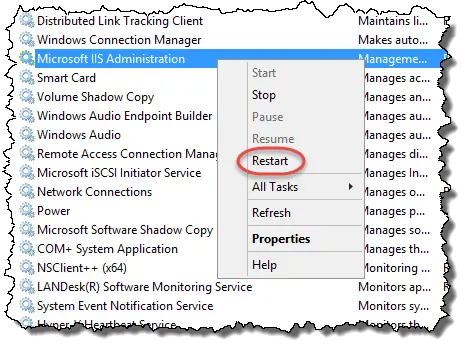
Remember to restart the “Microsoft IIS Administration” Service after making changes to the appsettings.json file so that it will be picked up.
You can also check which files IIS Administration has access to through the API. The end-point is /api/files/ and, if there are no files set up it will show an empty JSON array for the files part of the result.

Finally, if you are having difficulty saving the appsettings.json file, read how to take ownership of a file in order to be able to be able to write to it.